Features
From tender to final claim, in one system
Estimating, purchase orders, panel drawings, factory stock and progress claims in one system — built for facade and cladding subcontractors, and for the way any subbie actually prices and runs a job.
Updated
What is Subino?
Subino is job management software for Australian facade and cladding subcontractors, covering estimating, job costing, purchase orders, variations, progress claims, panel drawings to CNC-ready DXF and factory stock, with AI built in.
It runs a job from the tender email to the final claim in one system, so a subbie doesn't keep a spreadsheet beside the software to cover the gaps.
Construction services — the trades, where subbies work — employed 68.6% of everyone working in Australian construction in 2022–23. Source: ABS
01 — 7 tools
Win the tender
Everything between the invitation landing in your inbox and the proposal going back out — priced on your rates, in your cost codes, with every revision you have ever sent kept on the job.
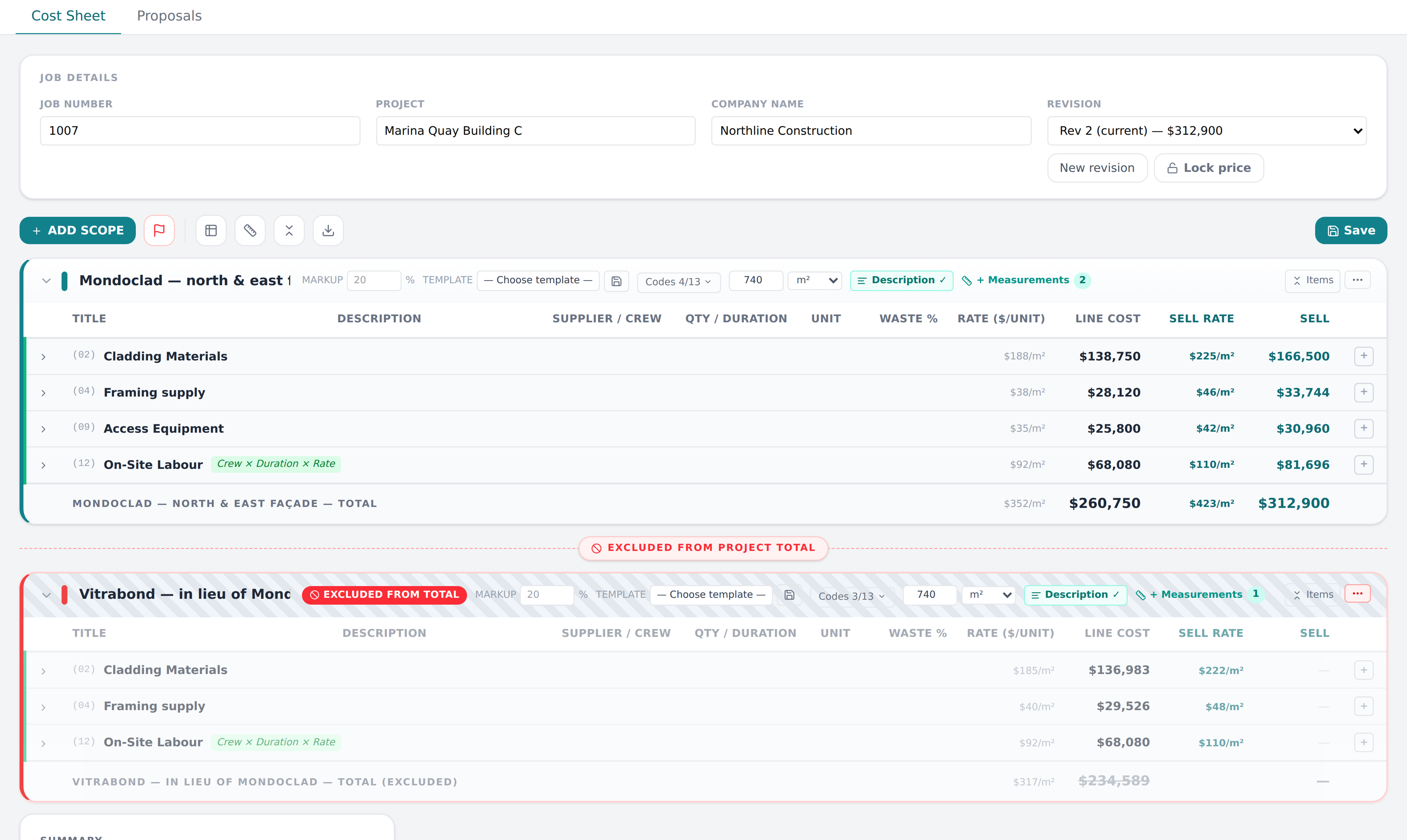
Cost, sell and the margin between them, on every scope — including the alternative you priced and did not win, which stays on the job.
Tender invitations in, without retyping
Paste the EstimateOne listing, the builder's invitation or the email, and the new job comes back filled in — project, site address, closing date, brief — with every tendering builder offered as a tick-box. Nothing is saved until you press Create.
The cost sheet
Labour, material, subbie and hire rates under your own cost codes, with waste, preliminaries and markup applied across the lot. Start a scope from a template, type a formula in a quantity cell, and price an alternative beside the scope without it touching the total.
Measurements that stay with the price
Your takeoff quantities are held against the scope they belong to, inside the revision you priced. Name a measurement once and every line built on it follows — and last year's revision keeps the quantities it was actually priced against.
Proposals, and every price you've sent
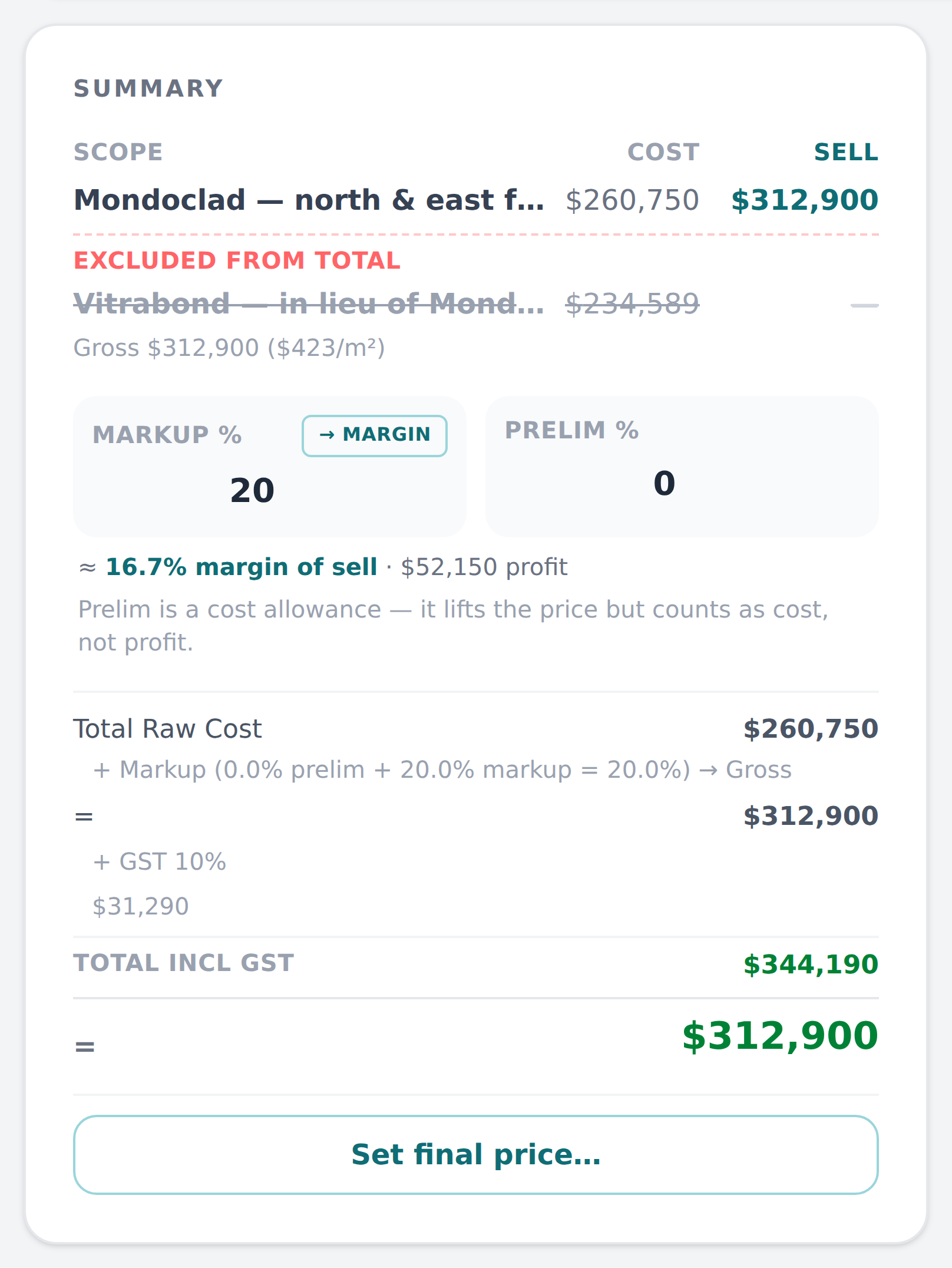
The proposal is built from the estimate you just priced and goes out as a branded PDF on your own email template. Send one estimate to several builders, each at their own agreed price — 'Set final price' records the negotiated number as a signed adjustment, so the cost sheet still tells the truth.
The board
Every job from invitation to awarded on one board, so you can see at a glance what is priced, what is submitted and what is still on your desk. Drag it across when it moves; the job keeps its whole history.
Follow-ups that stay on the job
Dated notes against the job itself, in order, with the next step and who owns it. Back-date one you did last week and it lands where it belongs. Deleted ones go to the recycle bin, not into thin air.
What did we charge for this last time?
Search every costed line you have ever priced by material, supplier or description, and see the rate on each job that carried it — the material rate separately from the installed rate, because only one of them is comparable.
02 — 3 tools
Panel drawings
The site measures a replacement panel and sketches it. Instead of a photo in a text thread and a phone call about what that number says, the sketch becomes a checked drawing and a cut file.
The panel as the crew confirmed it — the finished face, the cut blank around it, and the numbers it was drawn from. One more tap and the office has the DXF.
See panel drawings →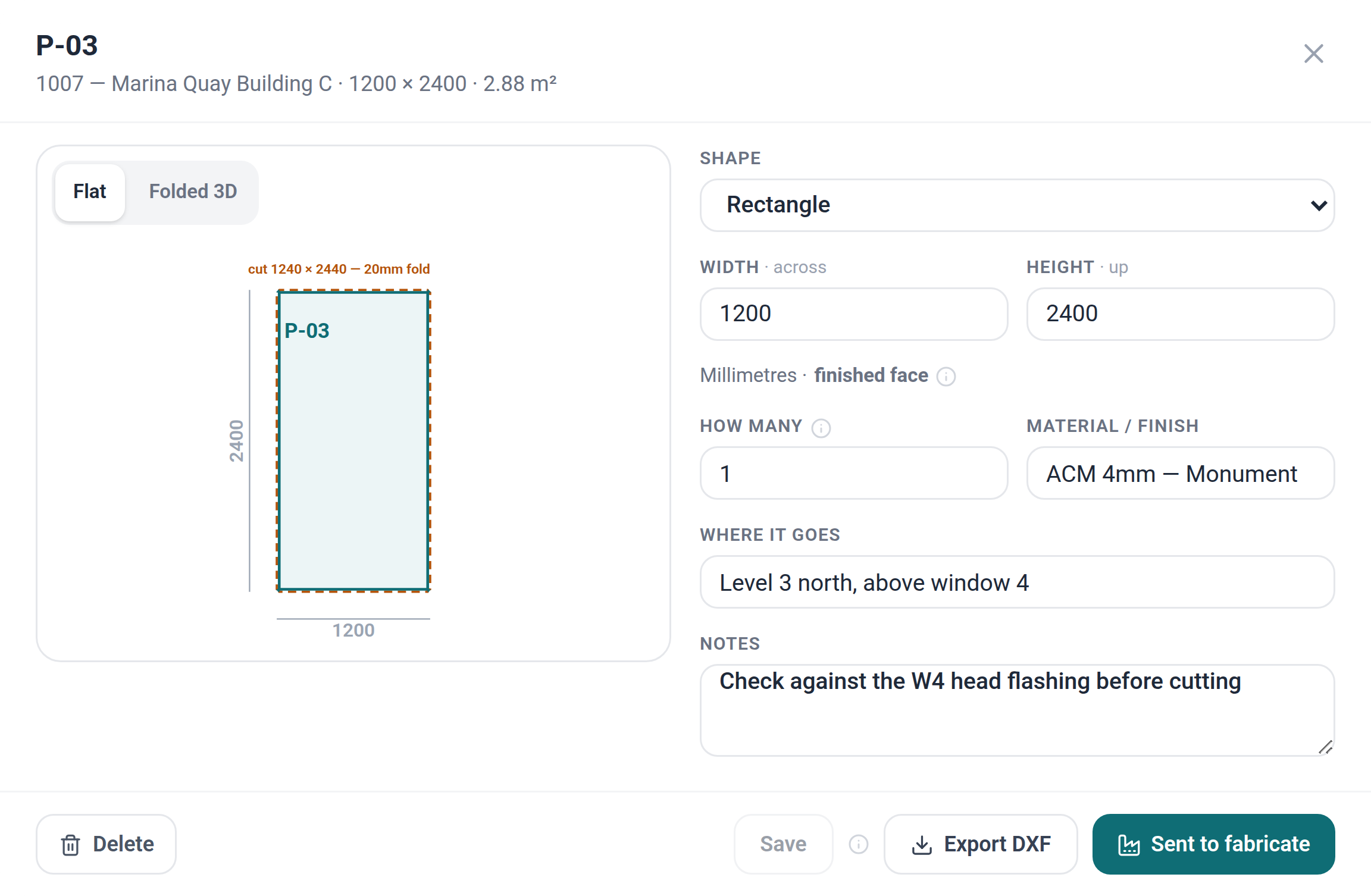
Photograph the sketch
The crew photograph the hand sketch on a phone — a page of several panels at once, up to eight photos. AI reads the dimensions written on it and never measures the picture: anything it can't read comes back blank, and the panel can't be confirmed until someone types it in.
Check it, confirm it, see it folded
The drawing redraws as the numbers are typed — the finished face, the cut blank around it, and a 3D view of the folded tray. One Confirm records who signed it off and when; change a dimension later and the panel goes back to draft as a new revision.
A CNC-ready DXF
The office downloads a DXF in millimetres: the cut blank with 20mm returns and notched corners on one layer, the fold grooves with 45° corner mitres on another, and the panel label with its revision. Rectangles, L-shapes and notched panels today; anything else is flagged for CAD, never forced into a rectangle.
03 — 3 tools
Factory stock
Buy a hundred top hats once, send ten to one job and twenty to another, and know what each job really cost — without a stock app on the side and a bill typed twice.
A delivery received line by line, with the freight shared out by value before you save — so every top hat carries its share of the truck.
See factory stock →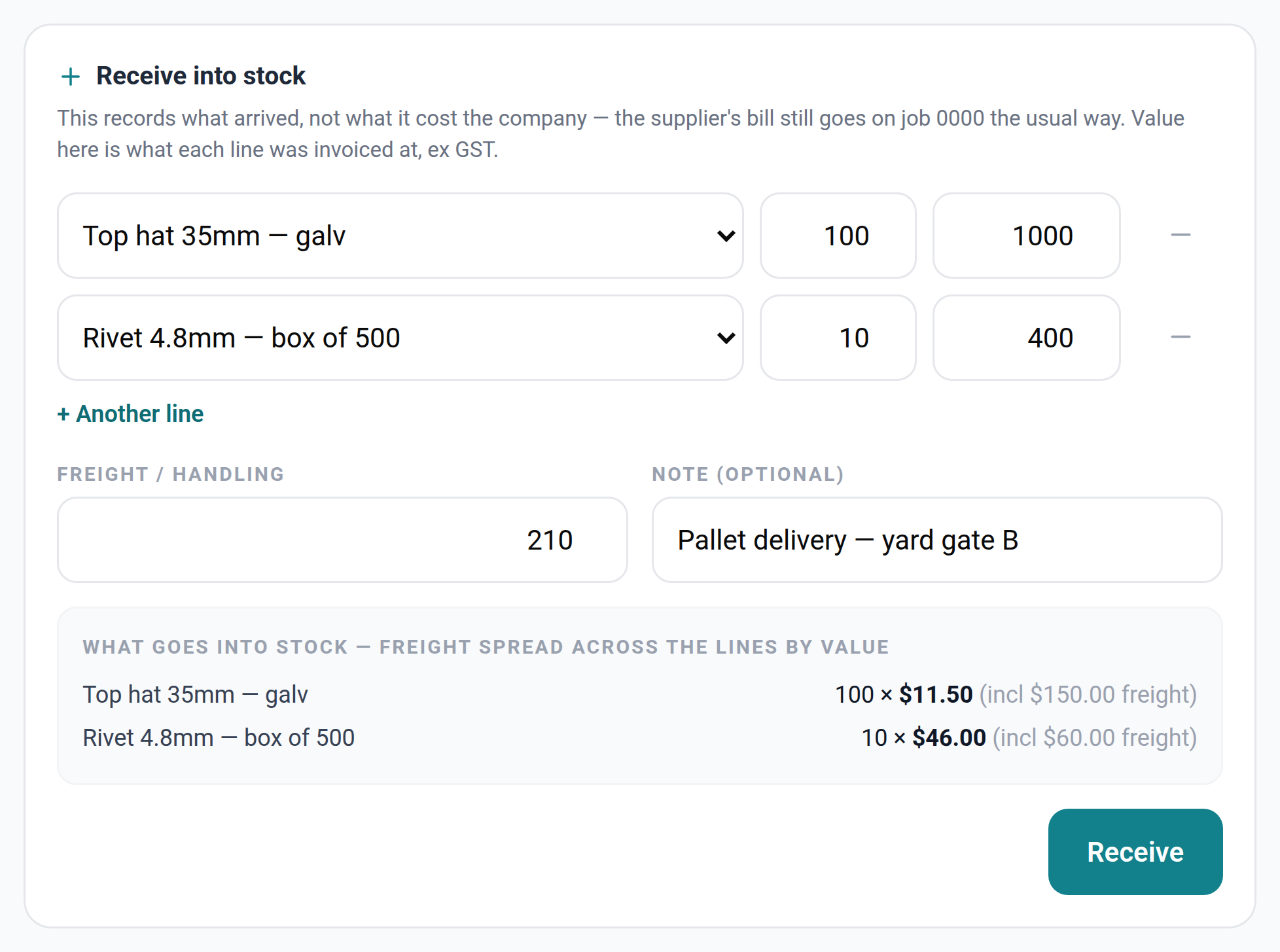
Issue it to the job from your phone
Pick the item, the quantity and the job. The cost lands on that job's budget under the item's own cost code, at the average price you paid — fixed on the day it goes out. Sent too many? Return them and the job gets the cost back.
Buy in bulk, freight shared fairly
Receive a delivery line by line and the freight is spread across it by value — $1,000 of top hats plus $150 delivery comes out at $11.50 each, not $10. You see the price before you save.
Know what's in the yard
What's on hand, what it's worth and how long since each item moved. Stocktake corrections need a written reason, a wrong price can be flagged on the spot, and Data health warns when stock gets ahead of the bills behind it. Off unless you hold stock.
04 — 7 tools
Run the money
The day you win, the estimate stops being a quote and becomes the budget. Everything you order and every invoice you receive lands against it, cost code by cost code.
The budget you track is the estimate you won, cost code for cost code. Nothing was re-typed to get here.
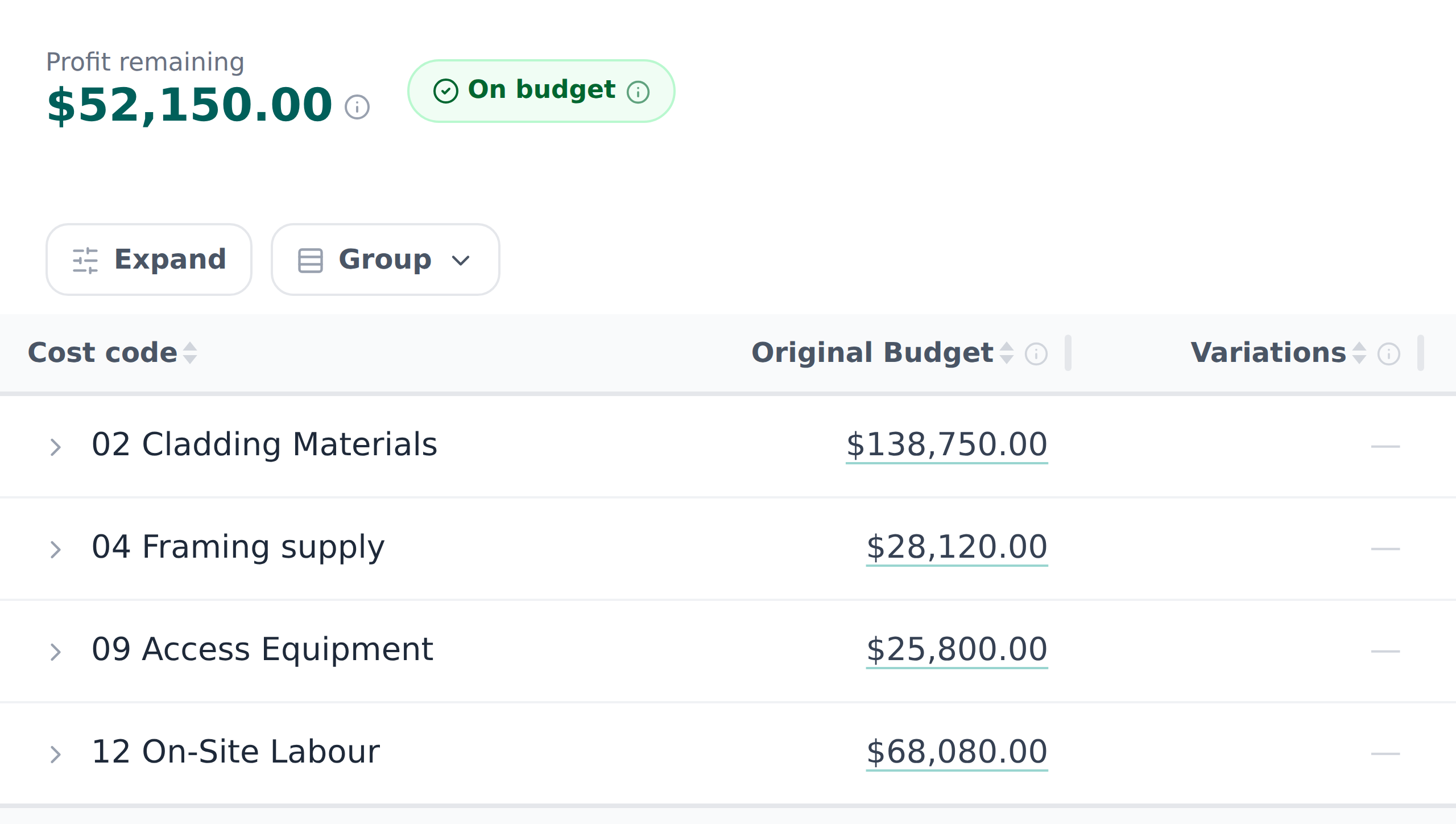
Win it, and the estimate is the budget
Awarding the job locks the contract to the winning revision, and the budget reads straight from that cost sheet, cost code by cost code. Nothing is re-typed, so nothing can drift from the price you won.
Forecast the final cost while you can still act
Original budget, variations, committed orders and actual cost — bills, labour and stock — on every cost code, with a forecast final cost and the profit remaining. You find out a code is sliding in the week it happens, not at close-out.
RFQs and purchase orders
Send an RFQ from the job — the email carries the scope of work and the line items, never your rates — and the supplier answers on a link. Turn the answer into an order against a cost code, and the committed cost is on the job the day you order.
Drop the supplier's quote on the RFQ
Their quote comes back as a PDF, or as three screenshots of an email. Drop them on the RFQ and the line items, quantities, unit rates and GST come back read out beside your own allowance, so you can see where they differ before you press Apply.
Master orders and draw-downs
Lock the supplier's price as the master order for the job, then draw purchase orders from it in batches as the work needs them, tracked line by line against the master.
Bills read for you, matched to their order
Drop the supplier invoice in and the supplier, invoice number, amount and due date come back filled in for you to check. Subino proposes the purchase order it belongs to — from the PO number on the invoice, or the supplier's only open order — and you confirm it before saving. Linked, it comes off that order first, so nothing is counted twice.
Bills through to Xero
Bills go to Xero as drafts, pre-coded to the account each cost code maps to, and the paid status comes back — so the job's actual cost and the ledger tell the same story. Connect it once, per company.
05 — 4 tools
Get paid
Claiming what you have earned, when you have earned it — including the work that was never in the original contract.
Progress claims against the contract
Claim by percentage complete against the scopes you priced, with the split a builder expects: original contract sum, approved variations, contract sum to date. Retention takes a percentage and a cap, and carries forward what is already held. Each claim's schedule of values is frozen when you claim.
Variations, priced and tracked
Price a variation off the job's own rates and markup and send it to the builder as a page they open by link and approve or decline. Approved variations flow into the next claim as their own line instead of being remembered.
A link the builder can just open
Send a purchase order, RFQ, variation, progress claim, shop drawing or follow-up as a secure link. They open it with no login, answer it there — approve, certify, price or query — and the answer lands back on the job with a timestamp. Links can be switched off.
Over- and under-billing across the book
Work in progress across every live job: percent complete by cost, revenue earned against what you have billed, cost to complete and expected gross profit. The number that tells you whether you are funding the builder.
06 — 7 tools
Run the site
The crew, the programme and the paperwork — with everyone seeing exactly what they should and nothing they shouldn't.
Crew app on iPhone and Android


Time clock, against the scope
The crew clock on to a job and a scope from their phone, with a location pin taken at the tap — no tracking. Split shifts and overtime at your own rate. The foreman fixes the day and signs off the week; after that a shift is locked to the crew, and any office correction is stamped with who made it.
The crew roster
Jobs down the side, the week across, the crew in a rail. Drag a person onto a job's day, and a double-booking is caught the moment you drop it. Copy last week, publish, and everyone sees their own week on their phone.
The programme, from the estimate
A Gantt programme with one task per priced scope, each taking its duration from that scope's install measurement — so the programme starts from what you actually priced. Already have it in Excel? Map the columns and bring it in.
The site diary
One log per job per day — who was on, weather, delays, photos from the phone. Two people can write the same day without one wiping the other, and every entry says who wrote it.
Drawings, versions and approvals
Project files with real version history — a superseded drawing stays superseded, and the current one is obvious. Send a shop drawing out for approval by link and the answer comes back against the file.
Every email lands on the job
Each job has its own forward-to address, so a supplier's email thread can be sent straight onto the job. Replies to anything Subino sent come back on that document, and a bounced email tells whoever sent it.
Tasks that reach the right person
Assign work with a due date on the job it belongs to — with watchers, @mentions, checklists, a daily digest and push notifications on the phone, so nothing sits unread for a week.
07 — 3 tools
AI built in
AI that does the typing: the tender invitation, the panel sketch, the supplier's quote, the invoice and the note you dictated in the ute. Every read comes back for a person to check before it is used.
Follow up by voice, from the ute
Tap the mic on your phone's keyboard and say what happened — “the Kingsway job needs a variation, Sofia's on it next week”. Subino works out which job you mean, writes the note, sets the next step with a date and assigns it. Nothing is saved until you confirm it.
The follow-up email, drafted
AI drafts the follow-up email to the builder from the job's own history — what was priced, what was sent and when. Sending it is still your call.
A job, summed up
A plain-English status summary of any job, and a headline plus next action for each thread of orders, variations and claims — saved on the job with a stamp showing what it read.
08 — 3 tools
Make it yours
The setup that means the software prices work the way your business does, and shows each person only their part of it.
Your price book and templates
A price book of your materials and rates, plus scope, description, terms and email templates — so a job you have done fifty times starts from the last one rather than from blank.
Permissions in the database, not the buttons
The crew, the office and management each see what their role allows because the database enforces it — not because a button was hidden. Money stays with the people who are supposed to see money.
Bring your existing jobs across
Bring your jobs, budgets, contacts, purchase orders and bills across from a spreadsheet — or from a Buildertrend export pasted into the template — mapped onto your own cost codes, rather than starting from zero.
Moving from Buildertrend or Excel? Bring your jobs with you.
Bring your jobs, budgets, contacts, purchase orders and bills across from a spreadsheet — or paste a Buildertrend export into the template — mapped onto your own cost codes, rather than starting from zero.
See Subino on your own numbers
Book a demo and walk through your estimating and job costing workflow with us — bring a live job and see the difference.
No obligation, no card — fifteen minutes on a job of your own.